Ai in Smartsign
AI IN SMARTSIGN
Smartsign’s new AI assistant
Get help with your screens, your content and how to use Smartsign. The AI assistant is available directly in Publisher in Smartsign 11, where you already work.
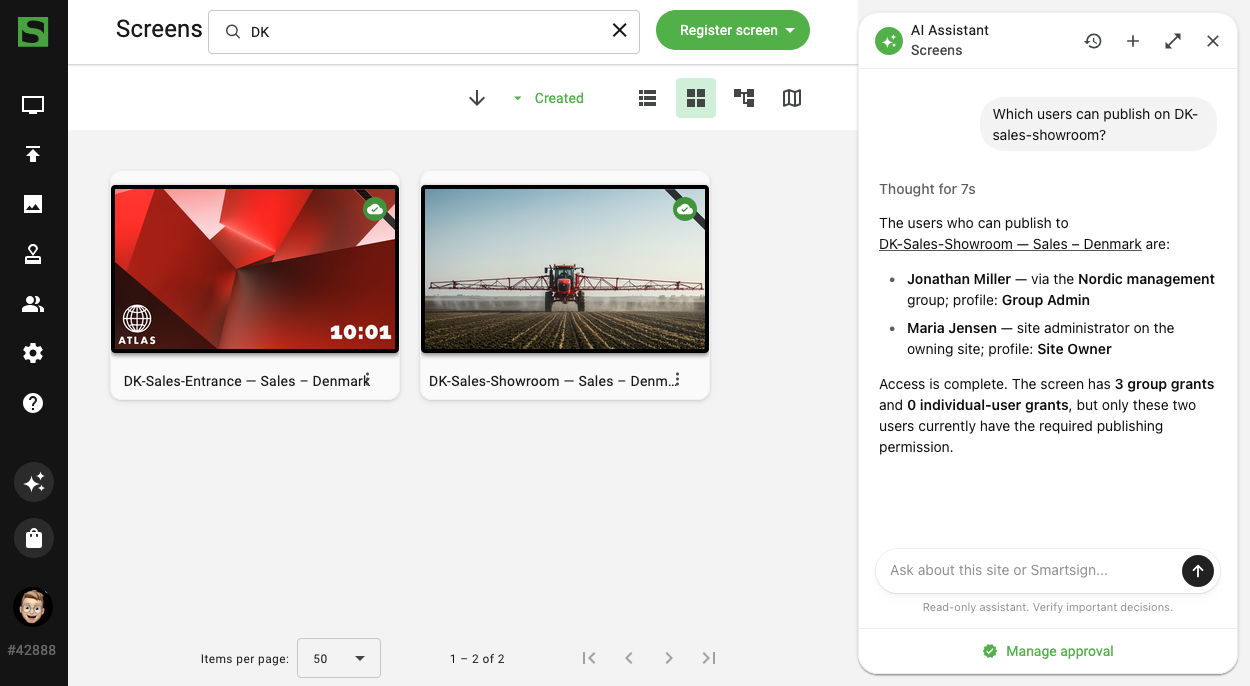
Less searching. More time for your message.
Ask a question in your own words. The assistant helps you find information about your site and understand how Smartsign works. Answers may include links to documentation and details in Publisher.
Screens and operations
Get help finding information about your screens and open a screen’s details to investigate further.
“Which screens are offline in Stockholm?”
Content and bookings
Ask about media, channels and bookings on your site. Follow the links in the answer to review the information and continue working.
“Help me find the booking for this week’s lunch menu.”
Help in Publisher
Get guidance on using Smartsign, with links to relevant documentation.
“How do I schedule a recurring booking?”
These examples show possible questions. Answers depend on the information available and your user context. Check important information in Publisher before making changes.
Help where you work.
The AI assistant opens in a panel alongside Publisher. Ask follow-up questions and follow links to screens, content or bookings to continue working.
You stay in control
The current assistant reads information and provides guidance. It does not change your screen settings or bookings, or publish content.
1. Review the AI terms
The AI assistant is only available in Smartsign 11. An authorised Site Owner must review and approve the AI addendum before the feature is activated.
2. Check your access
The AI assistant must be activated, and your user profile must have permission to use it.
3. Open the assistant
Select Assistant at the bottom of the main menu in Publisher and ask your question. If the option is missing, contact your administrator.
AI with clear terms and control.
The AI assistant is an optional feature covered by our specific AI Processing Addendum to the Data Processing Agreement (DPA). It explains how information is processed, where processing takes place and how long data is retained.
You choose to activate AI
An authorised Site Owner must approve the AI addendum and activate the feature before the assistant can be used. Approval applies to the site concerned.
Data processing in Microsoft Azure
Data and logs are stored in the Sweden Central data centre, and AI processing takes place within the EU. For Australian customers, data and logs are stored in Australia East, while inference uses Azure Global Standard.
No training on customer data
The content of AI assistant conversations is not used to train AI models. Smartsign continuously works to improve the assistant’s functionality and quality.
Limited retention
AI assistant conversations are retained only for a limited period and handled according to clear procedures for data protection and deletion.
What should AI help you with next?
The AI assistant helps you find information and get guidance in Publisher. We are developing several ways to make working in Smartsign easier and smoother.
Create layouts and templates
We are developing the AI assistant so it can also help you create layouts and templates in Smartsign.
A clearer overview
AI could help summarise relevant information and make it easier to get an overview of larger installations with many screens.
Support with content creation
Another potential area is help with ideas, wording and content planning, with clear boundaries for data processing and user control.
Frequently asked questions about AI in Smartsign
What can the AI assistant help me with?
It answers questions about your site and how to use Smartsign. You can get help finding information about screens, media and bookings, with links to details in Publisher and relevant documentation.
Can the assistant change or publish content?
No. The current assistant reads information and provides guidance. You make changes and publish content yourself in Publisher.
How do I get access to the assistant?
The AI assistant is only available in Smartsign 11. An authorised Site Owner must review and approve the AI addendum before the feature is activated. The AI assistant must be activated, and your user profile must have permission to use it. Select AI Assistant at the bottom of the main menu in Publisher and ask your question. If the option is missing, contact your administrator.
Does every user need to approve the AI terms?
No. An authorised Site Owner approves the terms for the site concerned. Users’ access to the assistant is managed separately through permissions and feature activation.
Where is the information processed?
Data and logs are stored in the Sweden Central data centre, and AI processing takes place within the EU.
Is the information used to train AI models?
No, the content of AI assistant conversations is not used to train AI models.
How long are questions and answers retained?
AI assistant conversations are retained only for a limited period and handled according to clear procedures for data protection and deletion.
Can we turn off the AI assistant?
Yes, the feature can be deactivated for the site, which stops new AI processing.
Can I trust every answer?
AI answers may be incorrect or incomplete. Check important information in Publisher and the documentation before acting on it.
Can I attach files in the chat?
Attachments are not supported by the current assistant. Ask questions about your site or how to use Smartsign directly in the panel.
Curious about AI in Smartsign?
Want to get started with the AI assistant? We can help you review your needs and requirements. If you use Smartsign 10, we can also help you plan the move to Smartsign 11. Not sure which version you have? Contact us and we’ll help you take the next step.